> ## Documentation Index
> Fetch the complete documentation index at: https://supermemory-claude-naughty-bhaskara-7bc56a.mintlify.site/llms.txt
> Use this file to discover all available pages before exploring further.
# Overview — What is Supermemory?
Supermemory is the memory and context engine for AI agents — and it's the state of the art, ranked **#1 on every major memory benchmark**: [LongMemEval](https://github.com/xiaowu0162/LongMemEval), [LoCoMo](https://github.com/snap-research/locomo), and [ConvoMem](https://github.com/Salesforce/ConvoMem).
Your AI forgets everything between conversations. Supermemory fixes that. It learns from every interaction, **reasons over a directed knowledge graph** to resolve contradictions and track how facts change over time, forgets what's expired, and serves the right context at the right moment — through one API.
## State of the art, by the numbers
Most memory systems claim to be better. Supermemory is measurably ahead — first place across all three independent benchmarks the field uses to grade AI memory.
| Benchmark | What it measures | Supermemory |
| -------------------------------------------------------- | ------------------------------------------------------------------------ | -------------- |
| [LongMemEval](https://github.com/xiaowu0162/LongMemEval) | Long-term memory across sessions, with knowledge updates | **81.6% — #1** |
| [LoCoMo](https://github.com/snap-research/locomo) | Fact recall across long conversations (multi-hop, temporal, adversarial) | **#1** |
| [ConvoMem](https://github.com/Salesforce/ConvoMem) | Personalization and preference learning | **#1** |
Read the full methodology on the [research page](https://supermemory.ai/research), or reproduce it yourself with [MemoryBench](/memorybench/overview), our open-source benchmarking framework.
## What makes Supermemory different
Most "memory layers" are a vector store that retrieves the nearest chunk. Supermemory is an engine that *understands* — which is why it tops the benchmarks instead of just claiming to.
Resolves contradictions, tracks temporal change, follows multi-hop relationships, and forgets expired facts automatically. Reasoning is why it wins every benchmark.
One evolving directed graph and a single ontology across all your data — not a flat vector store, and not a raw graph you have to traverse yourself.
Memory, user profiles, hybrid search (RAG), connectors, and file processing — together, sharing one context pool. No stitching five tools together.
Text, conversations, PDFs, images (OCR), video (transcription), and code (AST-aware chunking). Upload it and it just works.
One API, plus SDKs, a CLI, a memory filesystem, and MCP. Infrastructure you ship products on — not a closed box.
Hosted for zero-ops scale, or the full engine as one self-hosted binary — fully offline if you want, same API either way.
**Hosted or self-hosted — same API.** Use the [managed platform](https://console.supermemory.ai) for zero-ops scale, or [run the entire engine on your own machine](/self-hosting/overview) — one binary, zero config, fully offline. Move between them by changing a single `baseURL`.
## How does it work? (at a glance)
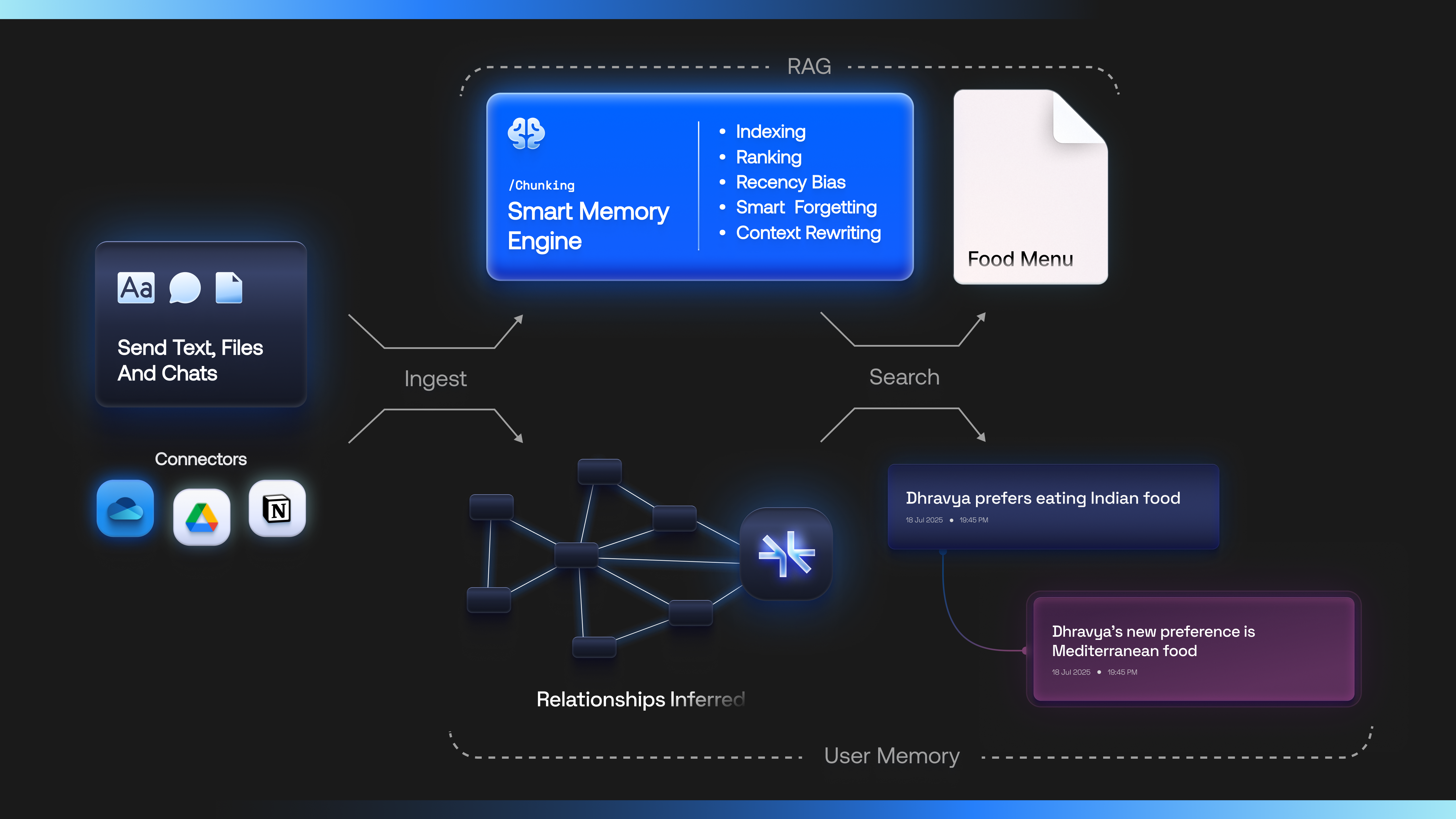 * You send Supermemory text, files, and chats.
* It [indexes them intelligently](/concepts/how-it-works) and builds a directed knowledge graph on top of an entity (a user, document, project, or organization).
* At query time, it fetches only the most relevant context and passes it to your models.
## Three ways to add context
Memory, profiles, and search all draw from the **same context pool** for a given user (`containerTag`) — so they reinforce each other instead of living in silos. Mix and match as your use case needs.
#### Memory API — learned user context
* You send Supermemory text, files, and chats.
* It [indexes them intelligently](/concepts/how-it-works) and builds a directed knowledge graph on top of an entity (a user, document, project, or organization).
* At query time, it fetches only the most relevant context and passes it to your models.
## Three ways to add context
Memory, profiles, and search all draw from the **same context pool** for a given user (`containerTag`) — so they reinforce each other instead of living in silos. Mix and match as your use case needs.
#### Memory API — learned user context
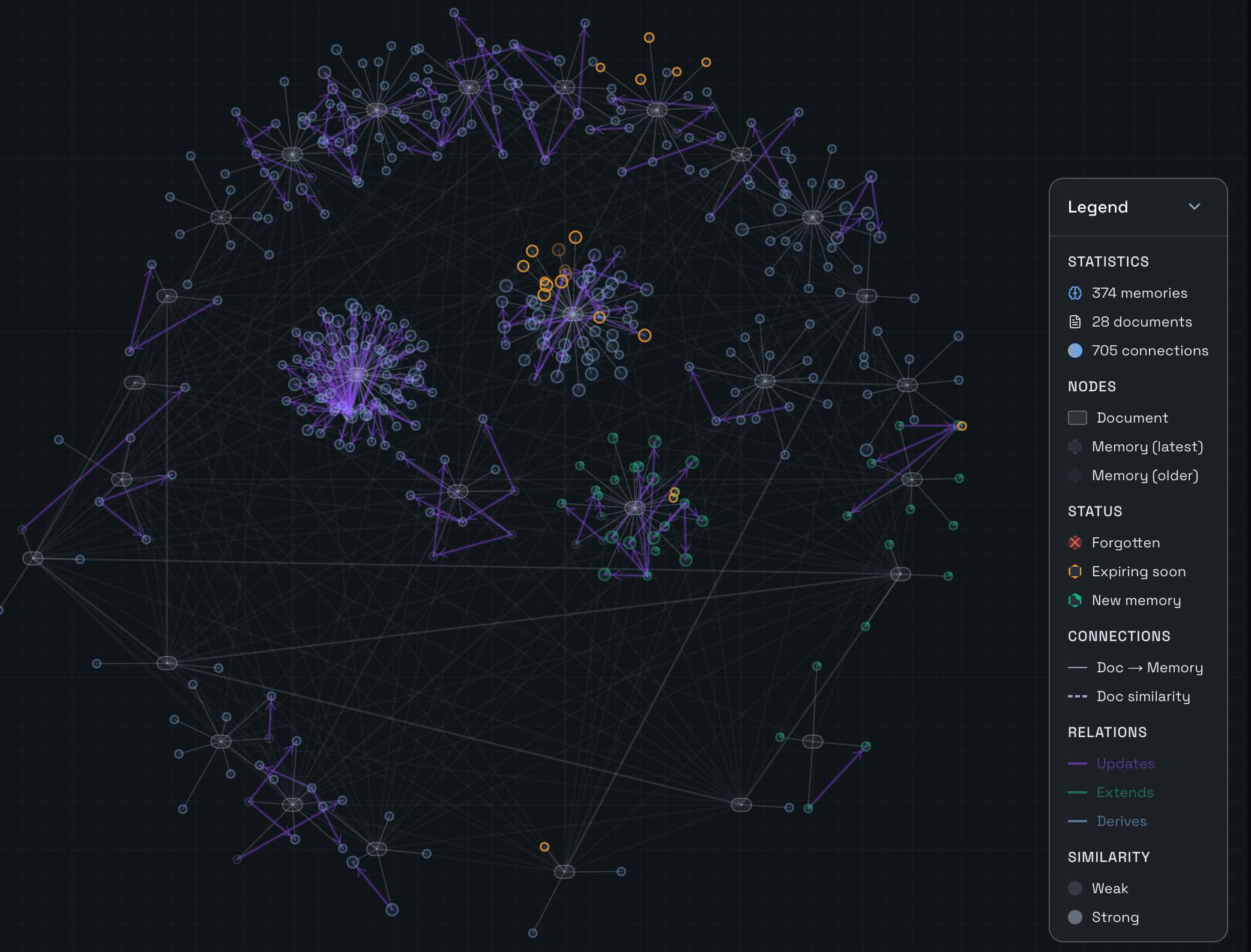 Supermemory learns and builds memory for each user — extracted facts that:
* [Evolve on top of existing context about the user](/concepts/graph-memory), **in real time**
* Handle **knowledge updates, temporal changes, and contradictions**
* Power a **user profile** that acts as the default context provider for the LLM
#### User profiles
The evolving context produces a [**User Profile**](/concepts/user-profiles) — the facts your agent should **always** know, in one \~50ms call:
* **Static:** stable facts the agent should always know.
* **Dynamic:** episodic context from the last few conversations.
#### RAG — advanced semantic search
Run hybrid [search](/search) over the raw content too: advanced metadata filtering, contextual chunking, and reranking — tightly integrated with the memory engine, in a single query.
## Start building
Make your first API call in minutes.
Ingest text, files, and conversations into a container.
Retrieve the most relevant context with hybrid semantic search.
## Ways to use Supermemory
The API is the core — but you don't have to talk to it directly. Reach Supermemory however fits your workflow:
Official TypeScript and Python SDKs, plus drop-in plugins for the AI SDK, OpenAI, LangChain, and more.
Manage memories, search, and scripting from your terminal — it's all `npx supermemory`.
Mount a container as a real directory your agent can `ls`, `cat`, and semantically `grep`.
Run the full memory engine on your own machine — one binary, zero config, fully offline.
Supermemory learns and builds memory for each user — extracted facts that:
* [Evolve on top of existing context about the user](/concepts/graph-memory), **in real time**
* Handle **knowledge updates, temporal changes, and contradictions**
* Power a **user profile** that acts as the default context provider for the LLM
#### User profiles
The evolving context produces a [**User Profile**](/concepts/user-profiles) — the facts your agent should **always** know, in one \~50ms call:
* **Static:** stable facts the agent should always know.
* **Dynamic:** episodic context from the last few conversations.
#### RAG — advanced semantic search
Run hybrid [search](/search) over the raw content too: advanced metadata filtering, contextual chunking, and reranking — tightly integrated with the memory engine, in a single query.
## Start building
Make your first API call in minutes.
Ingest text, files, and conversations into a container.
Retrieve the most relevant context with hybrid semantic search.
## Ways to use Supermemory
The API is the core — but you don't have to talk to it directly. Reach Supermemory however fits your workflow:
Official TypeScript and Python SDKs, plus drop-in plugins for the AI SDK, OpenAI, LangChain, and more.
Manage memories, search, and scripting from your terminal — it's all `npx supermemory`.
Mount a container as a real directory your agent can `ls`, `cat`, and semantically `grep`.
Run the full memory engine on your own machine — one binary, zero config, fully offline.